

Tracing
Setup
Requires Braintrust v3.34.0+ and@typesafe-ai/sdk v0.6.0 or later within v0.x. You need a TypeSafe account and API key.1
Install packages
2
Set environment variables
Set your Braintrust API key and TypeSafe API key in your shell:For the EU data plane, also set
BRAINTRUST_API_URL to https://api-eu.braintrust.dev. For a self-hosted deployment, use your data plane URL.Auto-instrumentation
Use Braintrust’s import hook to trace TypeSafe calls throughout your application.1
Initialize Braintrust and call Jev
Save this example as
trace-typesafe-auto.js. It asks Jev to route a support request, assess its urgency, and identify whether it mentions a duplicate charge.2
Run with the import hook
node --import can run the file directly. The Braintrust APIs work the same in TypeScript projects — compile your TypeScript to JavaScript, then run the compiled file with the import hook.If you’re using a bundler, see Trace LLM calls for plugin and loader setup.
typesafe.systemOne span to inspect the decisions.Manual instrumentation
Wrap individual clients withwrapTypeSafe() to choose which TypeSafe calls to trace.Manual instrumentation (AI SDK)
If your application calls Jev through AI SDK’sexperimental_evaluate(), wrap the ai module with wrapAISDK(). This requires AI SDK v7.0.103 or later within v7. In your existing AI SDK application, replace the direct import of experimental_evaluate() with the wrapped export:experimental_evaluate() with your existing evaluation model, state, and questions. Braintrust records an evaluate span with type question. The import hook also instruments this function. For evaluation calls, use the wrapper or import hook rather than relying only on AI SDK telemetry callbacks.What Braintrust traces
For eachTypeSafeClient.systemOne() call, Braintrust records a typesafe.systemOne span with type question:- Input state and questions, including question identifiers, instructions, and criteria
- Structured answers, including choices, scores, Noul values, and returned confidence and probabilities
- Model and provider metadata
- Token usage reported by TypeSafe and request duration
- Errors raised by the call
Tracing resources
Inspect Jev decisions
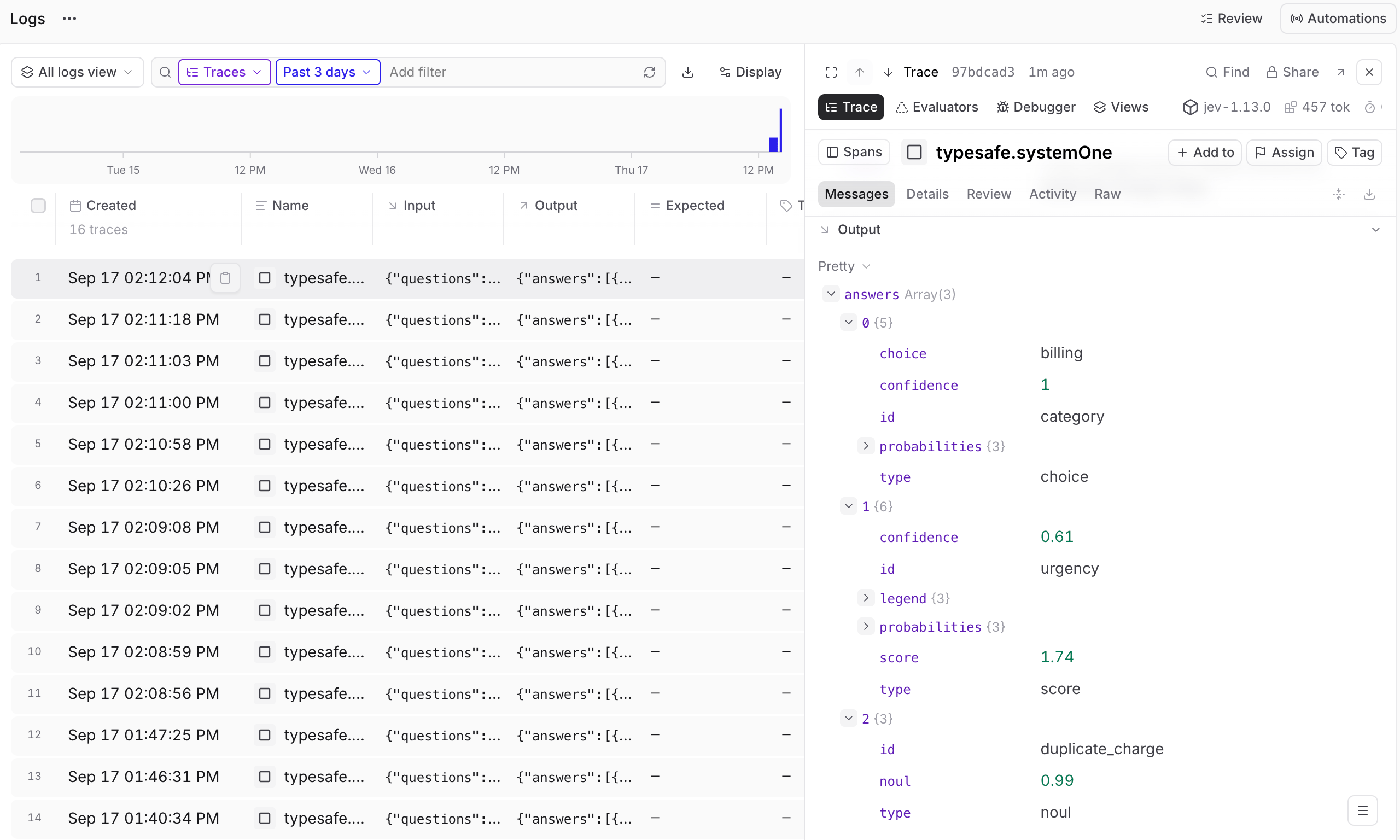
Select a question span in a trace and use the Pretty view for its input and output. The input shows the state sent to Jev and each question’s instructions and criteria. The output matches answers to questions by identifier, so you can inspect the decision alongside the question that produced it. The SDK integration records questions and answers as lists. Each entry’sid comes from its key in your request, such as category or urgency in the examples above. Use these identifiers to follow a question from its criteria to its answer.
Interpret the answer
For the support-request example, inspect
category to see the selected team and alternatives, urgency to see the result on the routine to urgent scale, and duplicate_charge to see the probability that the request describes a duplicate charge. Model responses can vary.
Understand confidence
Per-option probabilities show how Jev distributes probability across the possible answers. TypeSafe confidence summarizes how concentrated that distribution is. It is separate from the selected option’s probability and from an evaluation score. High confidence does not guarantee a correct decision. A Jev Score answer uses its own rubric scale: three levels correspond to a scale from0 to 2, not a normalized Braintrust score.